To fix echo in a Zoom call, find the participant whose speakers are feeding their own microphone and break that loop. Usually that means headphones on that person, or one device fewer in their room. The person causing the echo almost never hears it, because the loop sends their meeting audio back to everyone else, not to them. So start by asking who doesn't hear the echo, then work through the six moves below in order. Settings come fourth on purpose: Zoom's own echo article names three physical causes before any setting (support.zoom.com, read 9 Oct 2026).
This page is for you if you hear yourself or others repeated a beat late on Zoom. It isn't for you if the sound is choppy or robotic rather than repeated. That's a network or CPU problem, covered in the Still stuck list at the end.
Whose echo is it? The three patterns
Zoom's echo article lists three ways a meeting starts repeating itself, and each one leaves a different signature. Matching the pattern first saves you from changing settings on a laptop that was never the problem.
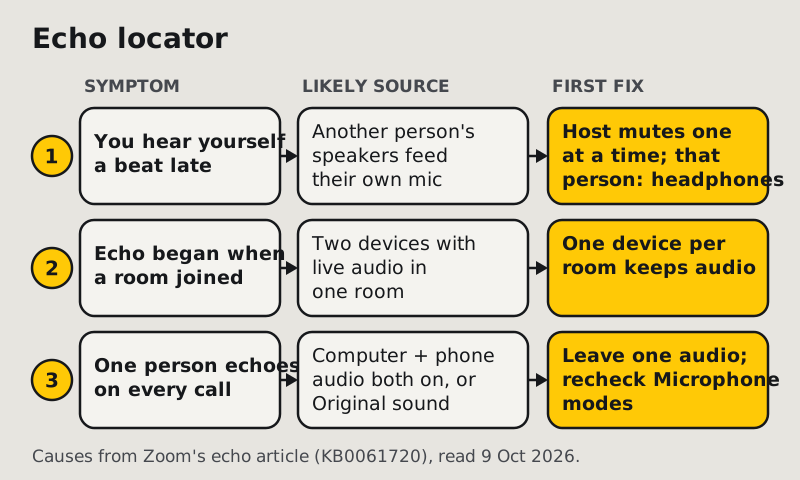
- You hear your own voice come back. Someone else's speakers are playing the meeting loud enough for their own microphone to pick it up. They hear nothing wrong. Everyone else hears themselves.
- The echo began the minute a meeting room or a second colleague joined. Two computers with active audio in one room, the case Zoom's article names, are feeding each other.
- One participant echoes on every call, whatever room they're in. Look at their setup, not their room: computer audio and phone audio connected at the same time, or a microphone mode that switches echo cancellation off.
1. Work out whose room the echo comes from
- Ask everyone to stay quiet while one person speaks.
- Ask out loud: "Who doesn't hear the echo?" The person who hears a clean call is the likeliest source.
- Watch the Participants panel. A microphone icon that lights up while someone else is talking is picking up playback from that person's speakers.
2. End the double join
This is the most common cause in offices and the easiest to fix.
- If you joined on your laptop and your phone, keep audio on one device only. Disconnect audio on the extra device (Leave Computer Audio in the desktop app), or decline the audio prompt on mobile.
- If you dialled in by phone while your computer is also connected to audio, hang up one of them. Zoom's echo article lists "computer and telephone audio both active" as a cause in its own right.
- Two colleagues at one desk or one table: one device carries the room's audio, and every other laptop joins with its microphone muted and its speaker volume at zero.
3. Get the speakers away from the mic
Zoom's article puts it plainly: "Muting is not enough as you mute the mic, but the speaker is still on." Echo needs a speaker, so the speaker is where the cleanest fixes are.
- Headphones on the source, not on the person complaining. Any wired or closed headphones end the loop. Brand and price make no difference to the echo.
- No headphones? Turn the speaker volume down to the lowest level people can still follow, and put distance between the speaker and the microphone. Zoom names "speakers too close" as a cause.
- A monitor with built-in speakers. Plugging in a monitor can quietly make it the output device, so playback comes from a screen right beside your mic. In Zoom's audio settings, pick your headset by name as the speaker.
- Open-back headphones or earbuds at high volume leak enough sound for a sensitive mic in a quiet room. Lower the volume first.
- Bluetooth headsets sometimes hand microphone duty back to the laptop while sound keeps playing in your ears. If Zoom shows the laptop's built-in mic as the input, select the headset's mic by name.
When speakers have to stay on
Krisp cleans what your mic sends and what you hear, with echo cancellation on by default. 7-day trial, no card (krisp.ai/pricing, read 9 Oct 2026).
Run the free week Krisp for Zoom users — the full picture →4. Check Zoom's echo cancellation setting
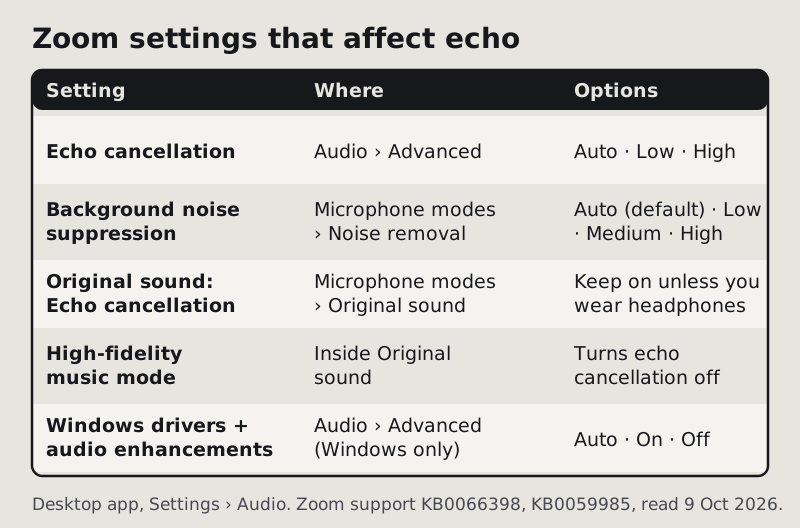
Zoom's desktop app has an echo cancellation control that most people never open. It's in Settings → Audio → Advanced → Echo cancellation, and on Windows, macOS and Linux it offers three options (Zoom support, read 9 Oct 2026):
- Auto: adjusts echo cancellation automatically, balancing CPU and performance.
- Low: better echo limitation with low CPU use.
- High: Zoom calls it the "best experience when multiple people are talking at the same time".
There's no "Aggressive" option in the current app, whatever older guides say. If people talk over each other a lot and the echo comes back during crosstalk, try High. On an older laptop that already struggles, Low keeps CPU use down.
The same Advanced panel has three Windows-only controls that can change how much processing your mic gets before Zoom sees it:
- Signal processing by Windows audio device drivers (Auto, On or Off). Off puts the drivers in "Raw" mode, so Zoom gets an unprocessed signal.
- Windows system audio enhancements (Auto, On or Off).
- Audio capture and playback API (Auto, WASAPI or WinRT).
Leave all three on Auto unless you're testing one change at a time. If echo appeared right after a headset driver update, set the driver signal processing to Off and retest, so Zoom's own canceller works on a clean signal.
5. Make sure Original sound isn't bypassing it
Original sound for musicians is a microphone mode in Settings → Audio → Microphone modes. It has three sub-options, and two of them affect echo:
- Echo cancellation keeps echo protection on inside the mode. Zoom recommends disabling it "only when using headphones to isolate audio or when playing instruments."
- High-fidelity music mode "disables echo cancellation and post-processing" and asks for a professional interface, mic and headphones.
Zoom keeps your microphone mode choice for future meetings. So one music lesson on speakers can leave a participant echoing in every meeting afterwards. Switch back to Noise removal, or switch the Echo cancellation sub-option back on, and retest. Our Original sound guide covers the mode in full.
6. Use host tools when nobody owns up
In large meetings, asking "who's echoing?" rarely gets an answer. Zoom's echo article gives the host two ways to isolate the source: mute attendees one at a time, or mute all, then unmute one at a time until the echo comes back.
- Mute all sits at the bottom of the Participants panel.
- Under More, Mute all upon entry stops a newcomer's room from echoing the moment they join.
- Ask all to unmute brings people back once the source is found.
- To stop a muted room unmuting itself straight back into the loop, the host can turn off Unmute themselves under Allow all participants to in the host tools.
Still stuck?
- Only you hear the echo. Nobody else's room is involved: your computer is playing the meeting twice. Close a second Zoom window or a browser tab still in the meeting, then set your speaker to the headset by name.
- The echo is short, metallic and never stops. That's room reverb, not a loop. Bare walls and hard floors send your own voice back into the mic. Move closer to the mic and put something soft in the room. Our background voices and noise suppression settings pages cover the processing side.
- Garbled or robotic rather than repeated. Not echo. Check your connection and close heavy apps; the Zoom audio test shows whether the problem is your gear or the network.
- A conference-room system plus laptops. The room system carries the audio. Every laptop in that room joins with computer audio off.
- Echo only on your Zoom phone app. The desktop echo cancellation options don't exist on mobile. Headphones are the fix there.
Quick answers
How do I fix echo in Zoom calls?
Find the participant whose speakers are feeding their mic: they're usually the one person who doesn't hear it. Put them on headphones or end their second audio connection. Then check Settings → Audio → Advanced → Echo cancellation, and make sure Original sound isn't switching echo cancellation off.
Why is my Zoom echoing?
Zoom names three causes: computer and phone audio both connected, speakers too close to the mic, and several computers with live audio in one room. If you hear your own voice come back, the cause is in someone else's room, not yours. Checked 9 Oct 2026.
How do I troubleshoot microphone echo on Zoom?
Mute participants one at a time, or mute all and unmute one at a time, until the echo stops. That identifies the room. Then fix that room's speakers first and its settings second. Muting alone doesn't fix it, because the speaker stays on.
Can headphones on my end stop an echo I'm hearing?
No. Headphones stop echo you cause. If you hear your own voice repeated, the loop is at another participant's desk, and their speakers have to change.
Does Zoom have an echo cancellation setting?
Yes. In the desktop app it's at Settings → Audio → Advanced → Echo cancellation, with Auto, Low and High. High is meant for meetings where several people talk at once. There's no "Aggressive" option. Checked 9 Oct 2026.