Zoom's Original sound for musicians is a microphone mode that turns off Zoom's noise suppression so that instruments and singing reach listeners as played. To turn it on, go to Settings → Audio → Microphone modes and select Original sound for musicians. Then pick its sub-options: keep Echo cancellation on unless you wear headphones, and add High-fidelity music mode or Stereo audio only if your equipment needs them. Use it for lessons, rehearsals and performances. Leave it off for ordinary meetings, because Zoom remembers the choice for every later call (support.zoom.com, read 9 Oct 2026).
1. What Original sound switches off
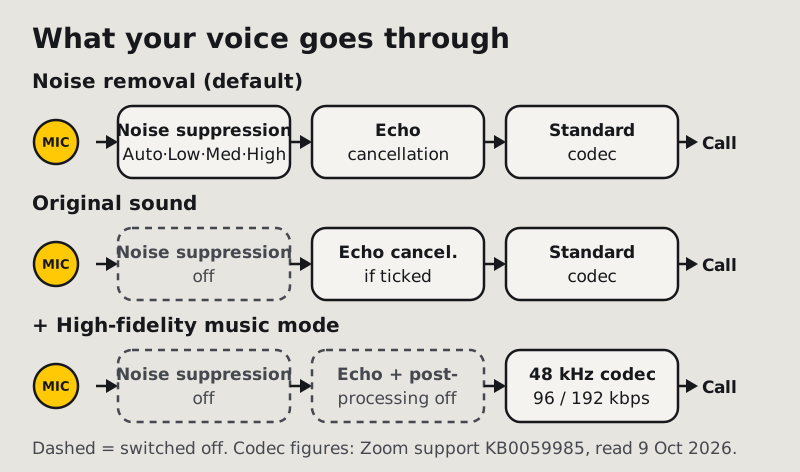
Zoom normally treats your microphone as a voice channel. Its default mode, Noise removal, runs background noise suppression at a level you choose: Auto (the default), Low, Medium or High. Speech-tuned processing like that hears a held violin note or a sustained chord as steady noise and pulls it down. That's why music sounds thin or wobbly on a normal Zoom call.
Zoom's own words on what changes: "If you enable Original sound for musicians in a meeting, all noise suppression is disabled." Turn the mode off again and the app goes back to whichever suppression level you had set before.
What's left depends on the sub-options you pick:
- Echo cancellation stays available as a sub-option, so you can keep that one protection while dropping noise suppression.
- High-fidelity music mode goes further. Zoom says it "disables echo cancellation and post-processing" and raises the audio codec to 48 kHz, at 96 kbps mono or 192 kbps stereo.
2. The sub-options: high fidelity, echo cancellation, stereo
Original sound has three checkboxes under it in Settings → Audio. Here is what Zoom says each one does, and who should tick it.
High-fidelity music mode. Turns off echo cancellation and post-processing and raises the codec to 48 kHz (96 kbps mono, 192 kbps stereo). Zoom says a "professional audio interface, microphone, and headphones" are required. Tick it for performances and lessons where tone matters and everyone on your side wears headphones. Skip it on a laptop mic with speakers, because you'll lose echo protection and gain nothing a built-in mic can deliver.
Echo cancellation. Zoom describes it as preventing "the creation of echoes between the mic and speakers" and recommends disabling it "only when using headphones to isolate audio or when playing instruments". The safe default for most teachers is to keep it on. Turn it off only when the room has no speakers playing the call.
Stereo audio. Encodes your mic in stereo, and Zoom says it "requires a stereo-capable microphone or audio interface". A single USB mic is mono, so ticking this changes nothing useful. Tick it for a stereo keyboard output, a stereo pair of room mics, or a mixer feeding two channels.
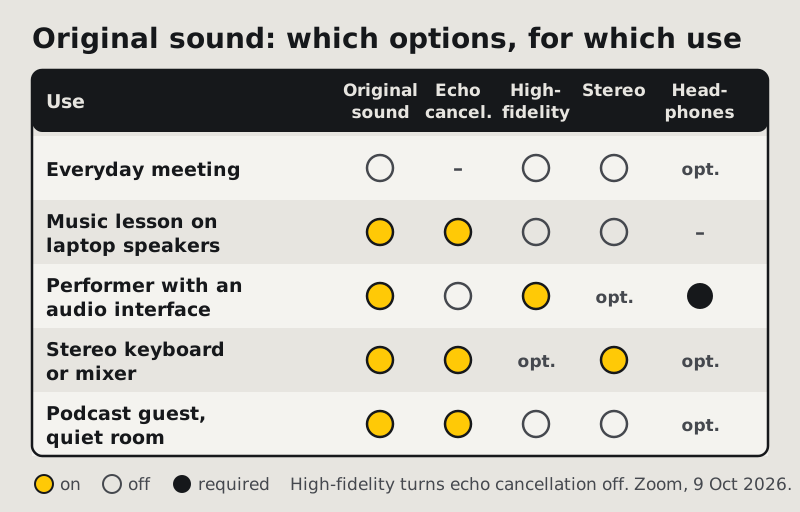
| Who you are | Original sound | Echo cancellation | High-fidelity | Stereo | Headphones |
|---|---|---|---|---|---|
| Everyday meeting | Off | (Zoom default) | Off | Off | Optional |
| Music teacher on laptop speakers | On | On | Off | Off | Not available |
| Performer with an audio interface | On | Off (high-fidelity turns it off) | On | If the source is stereo | Required |
| Keyboard or mixer with stereo out | On | On, unless on headphones | Optional | On | Optional |
| Podcast guest recording through Zoom, quiet room | On | On | Off | Off | Optional |
The podcast row is a judgement call. Original sound keeps the voice natural, but it also lets through every hum the room has. If your room isn't quiet, stay on Noise removal.
3. Turning it on (desktop and mobile)
Desktop (Windows, macOS, Linux):
- Click your profile picture, then Settings.
- Open the Audio tab.
- Under Microphone modes, select Original sound for musicians.
- Tick the sub-options from step 2 that match your setup.
Mobile (iOS and Android): on phones, Zoom says, Original sound is the one advanced audio profile on offer. Enable it in the app's settings before a meeting:
- Tap your profile picture, then Settings → Audio.
- Under Microphone modes, tap Original sound for musicians.
- During the meeting, tap More → Audio settings → Microphone modes to switch it on or off.
Zoom's mobile app has no Low, Medium or High suppression levels. Its default Noise removal adjusts itself, so on a phone the choice is simply Noise removal or Original sound.
4. The in-meeting switch
On desktop, click the up arrow next to the Audio (microphone) button in the meeting toolbar, open Microphone modes, and choose Noise removal (default), Personalized audio isolation or Original sound for musicians.
Two things Zoom's article says that catch people out:
- The choice persists. Whatever you select in the meeting stays selected for future meetings. There is no "this meeting only" switch.
- Switching off restores your old level. When you go back to Noise removal, Zoom uses whichever suppression level you set before (Auto, Low, Medium or High). If that was High from some earlier experiment, speech may sound clipped until you reset it.
Zoom's article also lists account types for in-meeting microphone-mode controls, but we couldn't verify that list from a US read, so we don't repeat it here. If the in-meeting menu is missing, ask your account admin whether the option is enabled.
5. The sabotage case: when Original sound makes calls worse
The setting that helps musicians hurts everyone else, and it does so quietly. Because the choice persists, a lesson on Monday leaves the mode on for Tuesday's stand-up. Colleagues then hear the fan, the keyboard and the dishwasher, and the person speaking has no idea why.
Check for it when:
- your noise suppression "stopped working" with no settings change you remember;
- one participant's audio sounds fuller but much noisier than everyone else's;
- echo appears from a participant who joins on laptop speakers (Original sound with Echo cancellation unticked, or High-fidelity music mode on).
The fix takes ten seconds: Settings → Audio → Microphone modes → Noise removal, then confirm the suppression level is Auto. For echo specifically, our echo on Zoom calls guide walks through the other causes.
A related setting can also make music pump up and down: Automatically adjust microphone volume, under Settings → Audio → Microphone. Zoom suggests disabling it if your audio fades in and out. For music with real dynamics, untick it and set your input level by hand.
Back to speech: getting ordinary calls quiet again
Once the performance is over, Noise removal is the right mode for talking. Our noise suppression settings guide explains what each level does. If Zoom's own filter isn't enough for your room, a desktop filter that sits in front of Zoom is the next step.
Lesson over, kitchen still loud?
Krisp filters your voice before Zoom hears it, and can clean what you hear too. 7-day trial, no card, then Core is $8/user/mo billed annually or $16 monthly (krisp.ai/pricing, read 9 Oct 2026).
Run the free week Krisp for Zoom users — the full picture →Don't run a separate noise filter during a music session, though. Any speech filter will treat instruments as noise, whether it's Zoom's or another app's. Pick your input by name (the interface for music, the filtered mic for meetings) and switch between them when you switch modes.
Still stuck?
- Music still sounds thin. Check that the meeting is actually using Original sound: open the up-arrow menu next to Audio and look at Microphone modes. Selecting it in Settings and then switching mid-meeting is easy to undo by accident.
- Stereo did nothing. Your mic is probably mono. Stereo audio needs a stereo-capable mic or interface.
- High-fidelity mode caused echo. It turns off echo cancellation by design. Wear headphones, or untick high-fidelity and keep echo cancellation on.
- Mid-call switching between talking and playing. Use the in-meeting Microphone modes menu each time; remember the last choice sticks for your next meeting.
Quick answers
How do I turn on Original sound in Zoom?
On desktop: profile picture → Settings → Audio → Microphone modes → Original sound for musicians, then pick its sub-options. In a meeting, use the up arrow next to the Audio button → Microphone modes. On mobile, enable it in Settings → Audio first, then use More → Audio settings during the meeting. Checked 9 Oct 2026.
What does Original sound for musicians do?
It disables all of Zoom's noise suppression so music isn't treated as noise. Its High-fidelity music mode sub-option also turns off echo cancellation and post-processing and raises the codec to 48 kHz, 96 kbps mono or 192 kbps stereo.
Should I use Original sound for normal meetings?
No. Without noise suppression, every background sound reaches the call, and the setting carries over to your next meetings. Use it for music, then switch back to Noise removal.
Does Zoom's high-fidelity music mode need headphones?
Zoom says it requires a professional audio interface, microphone and headphones. It turns off echo cancellation, so speakers would loop the call back into your mic.
Does Original sound work on the Zoom mobile app?
Yes. Zoom calls it the only advanced audio profile on mobile. Enable it in Settings → Audio, then switch it during meetings from More → Audio settings → Microphone modes.